
Flight logs that run the whole flight
The flight log is the starting point for everything else in Fleet Centr Aviation. Create the log with the aircraft, date, time, and route, then build the manifest, run weight & balance, and complete dispatch from that same record. After the flight, enter airtime and fuel and the aircraft totals move with it.
Choose the tracking fields each aircraft needs
Manifest, weight & balance, and dispatch all start here
Filter by date, pilot, or aircraft and export to CSV
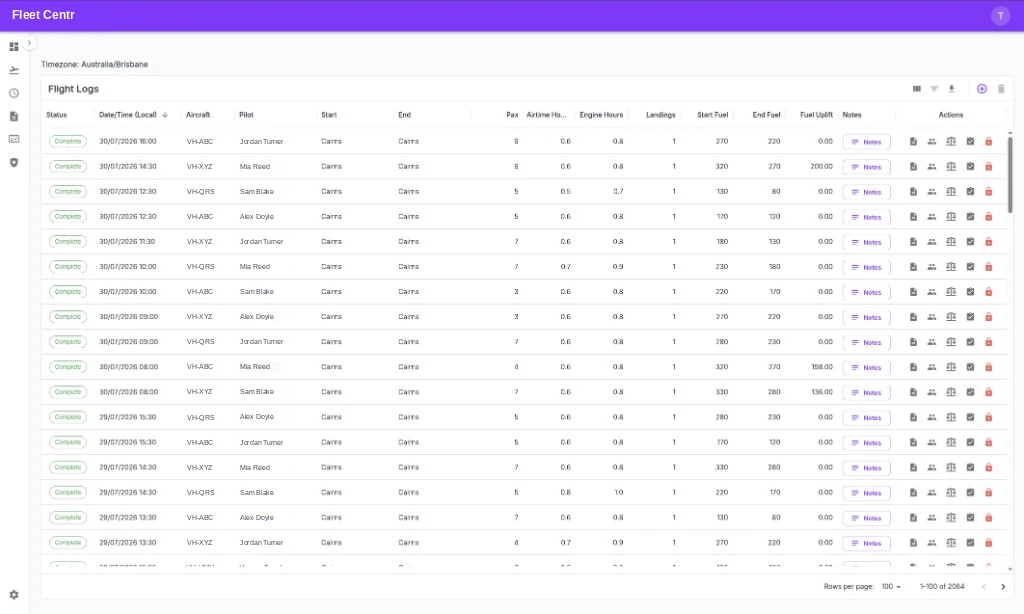
What flight logging covers
Tracking fields you choose
When you set up an aircraft you pick the fields it tracks — airtime, engine hours, landings, cycles, water landings, hook time — so the log matches the aircraft type and the mission you actually fly.
The hub for the flight
Create the log with aircraft, date, time, and start and end location. From there your crew build the manifest, run weight & balance, and complete the dispatch checklist.
Aircraft totals stay current
Airtime and fuel entered after the flight roll into the aircraft totals that drive utilisation reporting and hour-based maintenance schedules.
Filter and find anything
Filter by date range, pilot, or aircraft to answer a question in seconds rather than scrolling a spreadsheet or opening a folder of PDFs.
CSV export
Export filtered flight data straight to CSV for your accountant, your operations review, or whatever analysis you already run elsewhere.
API and MCP access
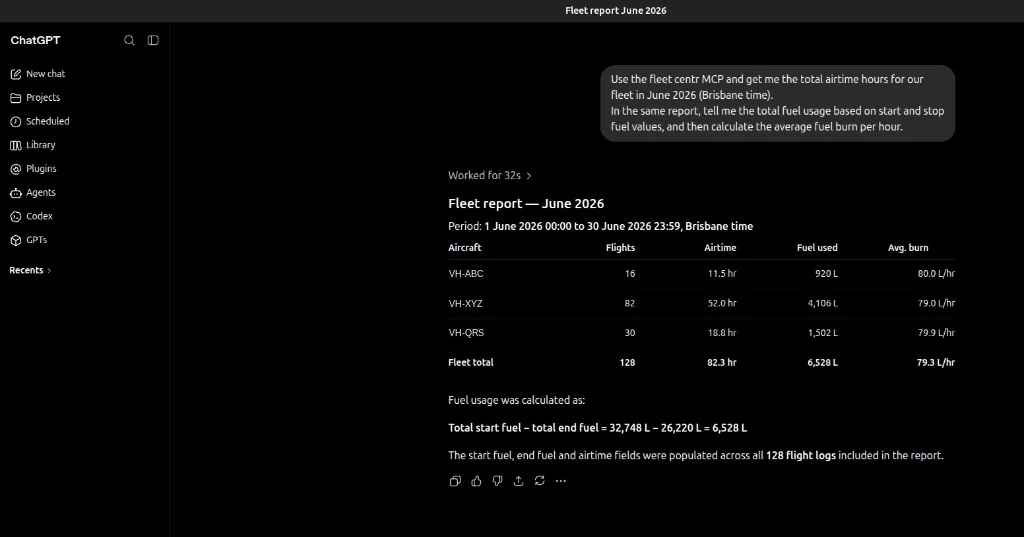
Flight log data is available through the REST API and the MCP server, so external reporting and AI-driven analysis work against live records rather than a monthly export.
How a flight moves through the system
The sequence is built to get a pilot ready to go flying, then capture what actually happened.
Create the log
Set the aircraft, date, time, and start and end location. The log now exists as the anchor for everything else on that flight.
Manifest, loading, dispatch
Add passengers or freight with weights, run the weight & balance against that aircraft, then complete the dispatch checklist to release the flight.
Fly, then close the log
Enter airtime, fuel, landings, and whatever else that aircraft tracks. Status shows immediately whether any required field is still missing.
Your data, wherever you need it
Flight log data is not locked in the app. Export it, query it over the API, or let an AI assistant read it through MCP.
Flight Logs questions
Yes. Tracking fields are configured per aircraft when you set it up, so you can record airtime, engine hours, cycles, landings, water landings, hook time, and other values relevant to your aircraft and mission profile.
The status on each line shows whether any required fields are missing, so a quick review of the list confirms your records are complete rather than auditing each flight individually.
Yes. You can filter by date range, pilot, or aircraft and export to CSV. Flight log data is also available through the REST API and the MCP server for external interpretation or automated reporting.
Flight logs are part of the Aviation Tools add-on at +$179/month, on top of the $39/month Operations Platform. Users and assets are unlimited on every plan.
Run the whole flight from one record
Start the 30-day Operations trial, then add Aviation Tools for flight logs, manifests, weight & balance, and dispatch.