
Maintenance and qualifications that never sneak up
Scheduling in Fleet Centr covers more than servicing. Maintenance events track against aircraft hours, vehicle distance, or a date. Defects come through with photos and comments. Staff qualifications like medicals and licences sit in the same list, with reminders before anything expires.
Track against vehicle odometer, aircraft TTIS, or calendar date
Upload docs and keep records on hand, archive old files
Track staff qualifications and asset maintenance in one schedule
Send reminders based on date or remaining hours/distance
Track components that move between parent assets
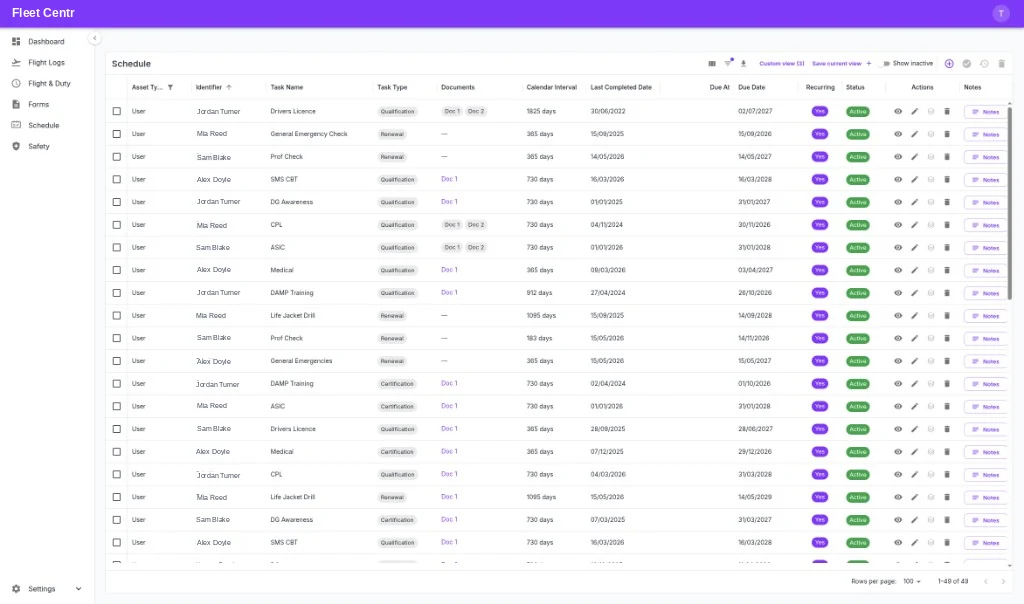
What scheduling handles
Hours, distance, or date
Add maintenance events and track them against aircraft hours, vehicle distance, or a calendar interval — whichever actually governs that item.
Defects with photos
View reported defects including the images and comments the person who found them attached, so you know what you are dealing with before anyone travels.
Completion history with documents
Clear an item and keep the history, with optional document upload so the invoice, release, or certificate is attached to the completion.
Staff qualifications too
Track medical certificates, licences, proficiency checks, and training in the same schedule as your assets. A grounded pilot and a grounded aircraft cost the same.
Reminders that reach someone
Set reminders on any item and send an email or SMS to a nominated contact, so the alert lands with the person who can act on it.
Driven by real usage
Hours come from flight logs and distance comes from GPS tracking, so due dates reflect what the fleet actually did rather than an estimate.
How an item runs its cycle
Set it up once and it keeps coming back on its own.
Add the item
Create the maintenance event or qualification, set the interval, and choose whether it tracks on hours, distance, or date.
Usage drives the due date
Flight logs and tracked distance update the totals, so the due date moves with actual utilisation. Reminders go out before it lands.
Complete and keep the record
Clear the item, upload the supporting document, and the next occurrence schedules itself with the history retained.
Advanced component tracking
Do you have assets with components that can move across your fleet? Aircraft engines, propellers, and engine parts — or special mission equipment such as stretchers, medical kits, and other gear?
Advanced component tracking lets you assign a component to a parent asset — an aircraft or vehicle — and inherit usage from that parent. Remove it for repair, swap it onto another aircraft, or change its location: link it to another asset and the hours and history move with it.
We built this from aviation maintenance experience, where engines, propellers, and other components are regularly removed for overhaul or service and rotate back into the fleet. Without proper component management, tracking actual hours and history is a nightmare.
Maintenance & Scheduling questions
Yes. Items can track against aircraft hours, vehicle distance, or a calendar interval. Hours come from your flight logs and distance from GPS tracking, so due dates follow real usage.
Yes. Medicals, licences, proficiency checks, and training all sit in the same schedule as asset maintenance, with the same intervals, due dates, and reminders.
Yes. Link a component to a parent asset so it inherits usage. When you remove it for repair or swap it onto another aircraft, change the location or parent link and the hours and history move with it.
Set a reminder on any scheduled item and Fleet Centr sends an email or SMS to a nominated contact before it falls due.
Clearing an item keeps the completion history, and you can upload a supporting document such as an invoice, release, or certificate against it.
Works with the rest of the platform
Stop finding out the day it expires
Start the 30-day Operations trial and put your maintenance and qualifications on one schedule. No credit card required.